更新中


iPhone Screenshots




iPad Screenshots



說明
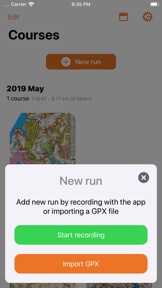
Control is an app for orienteerers. It is the perfect app for keeping track of your orienteering courses and analyzing them. It allows you to record a track in the app or import your existing track from a gpx file. You can also import a track directly from Garmin Connect if you subscribe to Total Control.
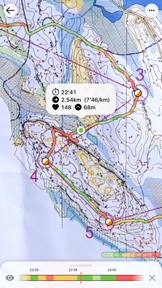
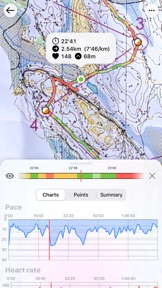
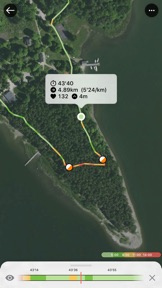
You can view the track on satellite map or on any map image you add to the app. Either import an image file from a scanner or take a picture right in the app, then calibrate and adjust the track. You can browse your course point-by-point, see the pace, HR, altitude along the way. Pace zone stats let you view the pace which you had in the different sectors of the track.
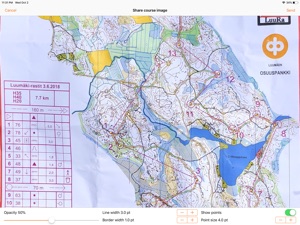
You can also export the route you took in GPX format as well as a fully-customisable image of the orienteering map and your route.
While you can share your track image with your friends, this app is made for you and your data is yours, data is not shared to any third party.
You can also enable iCloud syncing which enables you to see your courses on all your devices.
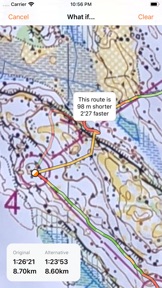
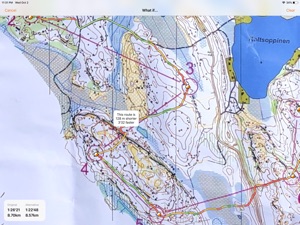
With What If -functionality, you can speculate how much better your time would've been without that one silly mistake... Available only to Total Control -subscribers.
With Control Apple Watch app you can track a route by carrying only your watch, it tracks the route completely offline. You can mark controls as you pass them. Also by just turning the Digital Crown. Afterwards, when you get back to your iPhone, the track is automatically synced to the iPhone app and to all your devices with iCloud.
Control Apple Watch app is integrated into HealthKit which means that you can see recorded workouts in Health app as well as in the Activity app under workouts tab.
Other Control for Apple Watch features:
- HealthKit integration
- Showing Heart Rate during run
- Displays the current GPS signal strength
Control's Privacy Policy: https://control-app.net/privacy.html
End User License Agreement: https://www.apple.com/legal/internet-services/itunes/dev/stdeula/
此版本中有什麼更新? (2.6.1)
- Some bug fixes
- Participate in Control 2021 User Survey right in the app!
銷售商
名稱
Petri Tilli
資訊
開發人員
類別
版本
2.6.1
大小
30.6 MB
Game Center
否
VPP Device Licensing
是
喜好程度
分級:4+
相容性
iOS 12.0 或更新版本
裝置
iPhone 5s, iPhone 6, iPhone 6 Plus, iPhone 6s, iPhone 6s Plus, iPhone SE, iPhone 7, iPhone 7 Plus, iPhone 8, iPhone 8 Plus, iPhone X, iPhone XR, iPhone XS, iPhone XS Max, iPhone 11, iPhone 11 Pro, iPhone 11 Pro Max, iPhone SE(第 2 代), iPhone 12, iPhone 12 Pro, iPhone 12 Pro Max, iPhone 12 mini, iPad(第 5 代)Wi-Fi, iPad(第 5 代)Wi-Fi + Cellular, iPad(第 6 代)Wi-Fi, iPad(第 6 代)Wi-Fi + Cellular, iPad Pro, iPad Pro (Cellular), iPad Pro(9.7 英吋), iPad Pro(9.7 英吋)(Cellular), iPad Pro 12.9 英寸(第 2 代), iPad Pro 12.9 英寸(第 2 代) Wi-Fi + Cellular, iPad Pro(10.5 英寸), iPad Pro(10.5 英寸) Wi-Fi + Cellular, iPad Pro(11 英寸), iPad Pro(11 英寸) Wi-Fi + Cellular, iPad Pro 12.9 英寸(第 3 代), iPad Pro 12.9 英寸(第 3 代) Wi-Fi + Cellular, iPad Air, iPad Air (Cellular), iPad Air 2, iPad Air 2 (Cellular), iPad Air(第三代), iPad Air(第三代) Wi-Fi + Cellular, iPad mini Retina, iPad mini Retina (Cellular), iPad mini 3, iPad mini 3 (Cellular), iPad mini 4, iPad mini 4 (Cellular), iPad mini(第 5 代), iPad mini(第 5 代)Wi-Fi + Cellular, iPad(第 7 代)Wi-Fi + Cellular, iPad Pro(11 英寸,第 2 代), iPad Pro(11 英寸,第 2 代)(Wi-Fi + 行動網路), iPad Pro(12.9 英寸,第 4 代), iPad Pro(12.9 英寸,第 4 代)(Wi-Fi + 行動網路), iPad Air(第四代)(Wi-Fi), iPad Air(第四代)(Wi-Fi + Cellular), iPad(第 8 代)Wi-Fi, iPad(第 8 代)Wi-Fi + Cellular, iPod touch (第六代), iPod touch (第 7 代), Apple Watch Series 4
語言
日文, 法文, 瑞典文, 芬蘭文, 英文
App Store:評等
評分與評論
0.0/5 (無評分)
App Store:評論
無條目