關於使用條款隱私政策聯絡
 
更新中
Delta Chat

Delta Chat

發行日期:2020-01-08
© Delta Chat contributors
Delta Chat - QR碼
版本 1.50.3
4+
App Store 下載
版本 1.50.3
4+
App Store 下載
發行日期:2020-01-08
© Delta Chat contributors

iPhone Screenshots

擷圖
擷圖
擷圖
擷圖
擷圖

iPad Screenshots

擷圖
擷圖
擷圖
擷圖

說明

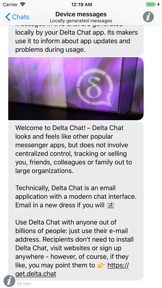
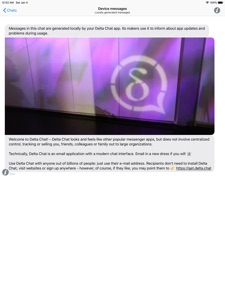
Delta Chat is a messenger that uses the largest, most diverse and decentralized communication system ever created: the existing e-mail server network. Just use your standard e-mail account and start chatting with any of your e-mail contacts, whether they have installed Delta Chat or not.
Technically, Delta Chat is an e-mail application but with a modern chat interface. E-Mail in a new dress if you will. Chat and contact data remain on your devices. No uploads or centralized control of addressbook, calendar or other personal data. There simply are no Delta Chat servers where anything could be uploaded to.
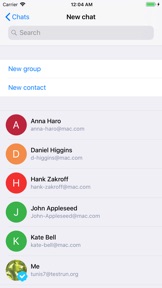
Use Delta Chat with anyone out of billions of people: just use their e-mail address. Recipients will see a simple e-mail and may directly reply with their own e-mail app. They don't need to install Delta Chat, visit websites or sign up anywhere. If you send a picture or other media to a chat group your chat recipients will see a nice regular e-mail with an attachment. If they send a message and attachments back, you will see the media in your chat for this contact.
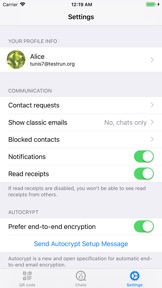
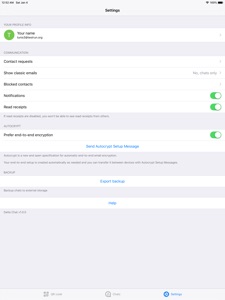
Delta Chat sends e-mails using your e-mail account and provider of choice. You can change mobile numbers without any trouble or even work without any SIM card or phone number at all. End-to-end encryption is established automatically when chat partners start communicating with each other.
Delta Chat is a relatively young project, but already has a lot to offer. It employs a pragmatic and usability-driven approach to decentralized messaging. No re-inventing of wheels unless one of them causes actual trouble or concern. We rather often think about removing technology than adding yet more of it, trying to keep things maintainable and understandable for us and others. Most popular programming languages and many human languages are involved in the development of Delta Chat apps and the various activities around it.
We are grateful for any help, be it contributing good bug reports, helping other users on the forum, participating in our open development with PRs and reviews, translations to more languages, working on new bots or setting up new experimental mail servers.

此版本中有什麼更新? (1.50.3)

- Don't change order of proxies when selecting a new one
- Add info messages about implicit membership changes if group member list is recreate
- Fix encrypted messages failures on some accounts (ignore garbage at the end of keys)
- Fix: Don't add "Failed to send message to ..." info messages to group chats
- Fix: Add self-addition message to chat when recreating member list
- Fix not showing "Notifications: Connected" even though PUSH is available (do not subscribe to heartbeat if already subscribed to PUSH)
- Fix "Show Full Message" being empty sometimes (if multiple text parts are cut)
These features will roll out over the coming days. Thanks for using Delta Chat!

銷售商

名稱

merlinux GmbH

資訊

開發人員

類別

版本

1.50.3

大小

55.9 MB

Game Center

VPP Device Licensing

喜好程度

分級:4+

相容性

iOS 12.0 或更新版本

裝置

iPhone 5s, iPhone 6, iPhone 6 Plus, iPhone 6s, iPhone 6s Plus, iPhone SE, iPhone 7, iPhone 7 Plus, iPhone 8, iPhone 8 Plus, iPhone X, iPhone XR, iPhone XS, iPhone XS Max, iPhone 11, iPhone 11 Pro, iPhone 11 Pro Max, iPhone SE(第 2 代), iPhone 12, iPhone 12 Pro, iPhone 12 Pro Max, iPhone 12 mini, iPhone 13, iPhone 13 Pro, iPhone 13 Pro Max, iPhone 13 mini, iPhone SE(第 3 代), iPhone 14, iPhone 14 Plus, iPhone 14 Pro, iPhone 14 Pro Max, iPhone 15, iPhone 15 Plus, iPhone 15 Pro, iPhone 15 Pro Max, iPhone 16, iPhone 16Plus, iPhone 16Pro, iPhone 16ProMax, iPad(第 5 代)Wi-Fi, iPad(第 5 代)Wi-Fi + Cellular, iPad(第 6 代)Wi-Fi, iPad(第 6 代)Wi-Fi + Cellular, iPad Pro, iPad Pro (Cellular), iPad Pro(9.7 英吋), iPad Pro(9.7 英吋)(Cellular), iPad Pro 12.9 英寸(第 2 代), iPad Pro 12.9 英寸(第 2 代) Wi-Fi + Cellular, iPad Pro(10.5 英寸), iPad Pro(10.5 英寸) Wi-Fi + Cellular, iPad Pro(11 英寸), iPad Pro(11 英寸) Wi-Fi + Cellular, iPad Pro 12.9 英寸(第 3 代), iPad Pro 12.9 英寸(第 3 代) Wi-Fi + Cellular, iPad Air, iPad Air (Cellular), iPad Air 2, iPad Air 2 (Cellular), iPad Air(第三代), iPad Air(第三代) Wi-Fi + Cellular, iPad mini Retina, iPad mini Retina (Cellular), iPad mini 3, iPad mini 3 (Cellular), iPad mini 4, iPad mini 4 (Cellular), iPad mini(第 5 代), iPad mini(第 5 代)Wi-Fi + Cellular, iPad(第 7 代)Wi-Fi + Cellular, iPad Pro(11 英寸,第 2 代), iPad Pro(11 英寸,第 2 代)(Wi-Fi + 行動網路), iPad Pro(12.9 英寸,第 4 代), iPad Pro(12.9 英寸,第 4 代)(Wi-Fi + 行動網路), iPad Air(第四代)(Wi-Fi), iPad Air(第四代)(Wi-Fi + Cellular), iPad(第 8 代)Wi-Fi, iPad(第 8 代)Wi-Fi + Cellular, iPad Pro(11 英寸,第 3 代), iPad Pro(11 英寸,第 3 代)(Wi-Fi + 行動網路), iPad Pro(12.9 英寸,第 5 代), iPad Pro(12.9 英寸,第 5 代)(Wi-Fi + 行動網路), iPad(第 9 代), iPad(第 9 代)Wi-Fi + Cellular, iPad mini(第 6 代), iPad mini(第 6 代)Wi-Fi + Cellular, iPad Air(第 5 代), iPad Air(第 5 代) Wi-Fi + Cellular, iPad Pro(11 英寸,第 4 代), iPad Pro(11 英寸,第 4 代)(Wi-Fi + 行動網路), iPad Pro(12.9 英寸,第 6 代), iPad Pro(12.9 英寸,第 6 代)(Wi-Fi + 行動網路), iPad(第 10 代), iPad(第 10 代)(Wi-Fi + 行動網路), iPad Air 11 吋(M2)Wi-Fi, iPad Air 13 吋(M2)Wi-Fi, iPad Air 13 吋(M2)Wi-Fi + 行動網路, iPad Pro 11 吋(M4)Wi-Fi, iPad Pro 11 吋(M4)Wi-Fi + 行動網路, iPad Pro 13 吋(M4)Wi-Fi, iPad Pro 13 吋(M4)Wi-Fi + 行動網路, iPad MiniA17Pro, iPad MiniA17ProCellular, iPod touch (第六代), iPod touch (第 7 代)

語言

中文, 世界語, 丹麥文, 亞塞拜然文, 俄文, 保加利亞文, 克羅埃西亞文, 加泰羅尼亞文, 加里西亞文, 匈牙利文, 印尼文, 土耳其文, 坦米爾文, 塞爾維亞文, 巴斯克文, 希臘文, 德文, 挪威波克默爾文, 捷克文, 撒丁文, 斯洛伐克文, 日文, 法文, 波斯文, 波蘭文, 泰盧固文, 烏克蘭文, 瑞典文, 立陶宛文, 羅馬尼亞文, 義大利文, 芬蘭文, 英文, 荷蘭文, 葡萄牙文, 西班牙文, 越南文, 阿拉伯文, 阿爾巴尼亞文, 韓文, 高棉文

App Store:評等

評分與評論

4.0/5 (1 評價)

App Store:評論

2020-02-14

不错

挺不错的,有这方面需求。
提点建议。
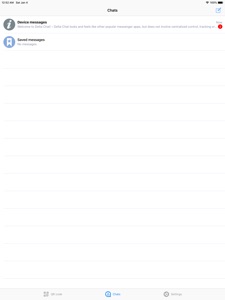
Chats页面的背景希望去除多余的分行线,对话没满的时候下面会有明显的分行线,显得多余。
已经发送的信息对方已阅后会再显示一遍。
能添加多个账号可能会更方便。
把底栏的QR code换成其他内容或者美化一下。
炒菜王炎
版本 1.1.1