更新中

Xequence 2
發行日期:2019-08-24
© 2017 Seven Systems Cross-Platform Media Ltd


iPhone Screenshots


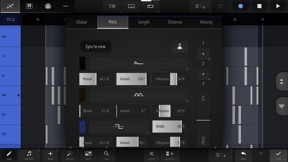
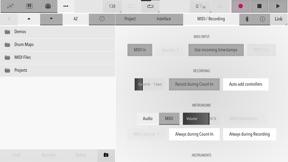
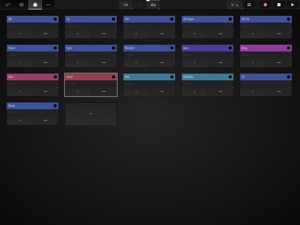
iPad Screenshots
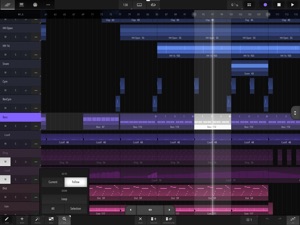


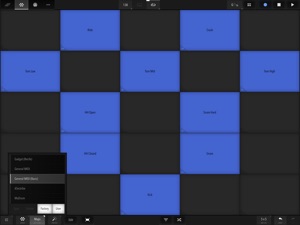



說明
This app is targeted at digital music production enthusiasts & professionals.
Xequence is a comprehensive, fast & reliable MIDI sequencer, editor, arranger & controller for iPhone & iPad.
Providing a desktop-class editing experience, it is the perfect centerpiece for a hardware studio, or for apps like AUM & Audiobus 3 to create a modular mobile music production environment.
HIGHLIGHTS:
- Efficient & fast User Interface for an amazing editing workflow
- Robust MIDI File Import & Export (notes, controllers, program changes, etc.)
- Extensive support for MPE (In-App Purchase) with per-note expression data editing
- Support for scales everywhere (keyboard, pianoroll, etc.)
- Over 70 included scales in 10 categories
- MIDI Time Stretching in all editors
- Best-in-class MIDI timing and clock output
- Full Ableton Link 3 support
- Full Audiobus 3 support
- MIDI In & Thru with re-channelization & re-routing
- MIDI Sync Master (Clock/Start/Stop/Continue/SPP) to sync other DAWs & sequencers to Xequence, e.g. to use audio tracks, or external drum machines. Several options for compatibility
ARRANGER:
- Unlimited Clips
- Unlimited Tracks
- Unlimited Sub Tracks per Track
- 64 Undo/Redo steps
- Flexible grid
- Per-track non-destructive Swing & MIDI Delay
- Linked Clips / Clones (editing the original changes all copies)
- Powerful clip-based, per-track independent looping
- Program changes
- Selection tools: Marquee/Rectangle, Same Track, Same Instrument, Linked Clips, Invert, etc.
- Editing tools: Create Copy, Create Linked Copy, Unlink, Split, Join, Convert loops to clips, etc.
- Global clipboard, even between projects
- Movement/Trimming Handles at screen edges for efficient editing
PIANOROLL EDITOR:
- 256 Undo/Redo steps
- Scale-awareness ("folding")
- Relative or absolute grid (move by grid increments or snap to nearest grid lines)
- Live MIDI previews of all edits
- Selection tools: Box, Same Note, Same Key, Same Beat Position, Invert, etc.
- Editing tools: Copy, Legato, Quantize, Quantize Ends, Octave +/-, Flip H/V (mirror), Fill clip with selection, etc.
- Smart Draw mode: Touch to create, touch again to delete, drag up/down to transpose, drag left/right to change length
- Global clipboard, even between projects
- Configurable "ghost" overlays
- Note velocities quickly adjustable via a handle, or editable like controllers, see below:
CONTROLLER EDITOR:
- 256 Undo/Redo steps
- Selection tools: Box, Same Beat Position, Invert
- Selection modes: Add & Replace
- Editing tools: Copy, Reduce, Quantize, Compress/Expand, Flip H/V (mirror), Ramp (various curves), Fill clip with selection
- Smart Draw mode
- Note Velocities can be shown as controllers and edited with the same tools
- Configurable vertical grid & value entry
KEYBOARD / CONTROLLER:
- Scale-aware, very playable single or dual keyboards
- Glide support
- Adjustable key width
- Velocity emulation (via vertical position)
- Drum maps and pads, fully editable, 40+ factory maps
- Touch ribbons for live control
- Controllers can be moved by sliding (ribbon), device rotation (up to three axes at once), like a button (sustain pedal, "trance gates"), or by touching the keys at different vertical positions. All highly configurable.
INSTRUMENTS:
- Unlimited Instruments (MIDI configurations for devices / apps)
- Up to 150controller slots per Instrument
- Optional support for (N)RPNs (In-App Purchase)
- Loading & Saving of instruments for re-use in other projects, 40+ factory presets included (In-App Purchase)
- Compatible with virtually ALL apps and class-compliant MIDI interfaces
VARIOUS:
- Audio or MIDI Metronome
- Note chasing (notes play even when playback starts in the middle)
- Controller chasing
- Perfect song looping, no dropouts/jitter at loop points
- Supports any time signature/BPM (fixed per song)
- Includes PolyHymnia, an advanced Generative Music module
- Light and Dark themes
Please report any issues via our website, we provide quick and comprehensive support!
此版本中有什麼更新? (2.4.0)
NEW:
- Instruments: Xequence now comes with over 40 factory instrument (MIDI configuration) templates. More to be included in the future. They can be accessed in the "Factory" folder via the usual "Load" button in the instrument editor (In-App Purchase required).
- Arranger: When opening an editor for a clip with linked clips, the "xx linked" notification now contains a direct "Unlink" button, removing the need for a tedious round-trip to the arranger and back.
- Pianoroll: New "Remove doubles" option in the "Process" menu to remove notes starting at (almost) the same time: Only the longest of all overlapping notes will be kept. Notes with higher velocity will be prefered if in doubt.
- Recording: Prevent double notes: Only keep longer / higher velocity notes (can be disabled in settings).
- Recording: If a newly recorded clip overlaps with existing clips, Xequence will now offer to merge them or move the clip to a new sub-track.
IMPROVEMENTS:
- When Xequence is hosted as an IAA, the host's icon is now shown as an additional tab in the top toolbar and you can switch back to it with a single tap.
- Keyboard: Reorganized and much improved key and scale selector.
- Keyboard: Controller ribbons to be shown can now be selected directly on the keyboard screen (instead of in instrument settings). Also, the limit of 3 controller ribbons has been removed.
- Keyboard: Improved touch handling for better response time and less wonkyness with wild playing styles.
- Keyboard: Much improved key-position-to-controller handling for all 3 modes.
- Drum Pads: Drum maps can now be more efficiently selected via the regular file selector.
- Arranger: Instrument settings for each track's target instrument can now be accessed directly from the track menu.
- Arranger: Mute and Solo buttons are now directly accessible at any vertical zoom level.
- Arranger: Current track is now always drawn taller, providing access to all buttons at any vertical zoom level.
- Arranger: Generally improved dynamic tracklist layout.
- Arranger: Significantly smoother editing under high CPU load.
- Arranger: Tweaked clip previews.
- Arranger: When naming clips, if all selected clips already have the same name, pre-fill the input box with it.
- Toolbars: Added labels to top and keyboard toolbar icons.
- When loading a project that uses 'Xequence Source' and it is not enabled, offer to enable it.
MISCELLANEOUS:
- Timestretching now by default turns itself off again every time the horizontal handles are used; this is probably a rarely used mode and having it unexpectedly enabled probably often gives unexpected results (the old behaviour can be restored in Settings).
- Arranger: Undo / Redo now always preserves which track is selected.
- Various little user interface tweaks to make life more productive.
- MIDI Sync: When recording, the Count-In is now be excluded so that the slaves only start after the Count-In.
FIXES:
- Keyboard: Kill any held notes when changing scales.
- Keyboard: Fix problem with keys sometimes sending the wrong (maximum) velocity when sliding between keys with multiple fingers in dual mode in both manuals simultaneously.
- Controller Editor: Fix existing automation not being deleted when recording new automation via the left-hand ribbon and recording is started while the ribbon is already being touched.
- Recording: Fix rare situation where controller data recorded during count-in could be written one or more bars early.
- Fix rare situation when Xequence's settings could revert to defaults.
銷售商
名稱
Seven Systems Cross-Platform Media Limited
資訊
類別
版本
2.4.0
大小
8.5 MB
Game Center
否
VPP Device Licensing
是
喜好程度
分級:4+
相容性
iOS 13.2 或更新版本
裝置
iPhone 5s, iPhone 6, iPhone 6 Plus, iPhone 6s, iPhone 6s Plus, iPhone SE, iPhone 7, iPhone 7 Plus, iPhone 8, iPhone 8 Plus, iPhone X, iPhone XR, iPhone XS, iPhone XS Max, iPhone 11, iPhone 11 Pro, iPhone 11 Pro Max, iPhone SE(第 2 代), iPhone 12, iPhone 12 Pro, iPhone 12 Pro Max, iPhone 12 mini, iPhone 13, iPhone 13 Pro, iPhone 13 Pro Max, iPhone 13 mini, iPhone SE(第 3 代), iPhone 14, iPhone 14 Plus, iPhone 14 Pro, iPhone 14 Pro Max, iPad(第 5 代)Wi-Fi, iPad(第 5 代)Wi-Fi + Cellular, iPad(第 6 代)Wi-Fi, iPad(第 6 代)Wi-Fi + Cellular, iPad Pro, iPad Pro (Cellular), iPad Pro(9.7 英吋), iPad Pro(9.7 英吋)(Cellular), iPad Pro 12.9 英寸(第 2 代), iPad Pro 12.9 英寸(第 2 代) Wi-Fi + Cellular, iPad Pro(10.5 英寸), iPad Pro(10.5 英寸) Wi-Fi + Cellular, iPad Pro(11 英寸), iPad Pro(11 英寸) Wi-Fi + Cellular, iPad Pro 12.9 英寸(第 3 代), iPad Pro 12.9 英寸(第 3 代) Wi-Fi + Cellular, iPad Air, iPad Air (Cellular), iPad Air 2, iPad Air 2 (Cellular), iPad Air(第三代), iPad Air(第三代) Wi-Fi + Cellular, iPad mini Retina, iPad mini Retina (Cellular), iPad mini 3, iPad mini 3 (Cellular), iPad mini 4, iPad mini 4 (Cellular), iPad mini(第 5 代), iPad mini(第 5 代)Wi-Fi + Cellular, iPad(第 7 代)Wi-Fi + Cellular, iPad Pro(11 英寸,第 2 代), iPad Pro(11 英寸,第 2 代)(Wi-Fi + 行動網路), iPad Pro(12.9 英寸,第 4 代), iPad Pro(12.9 英寸,第 4 代)(Wi-Fi + 行動網路), iPad Air(第四代)(Wi-Fi), iPad Air(第四代)(Wi-Fi + Cellular), iPad(第 8 代)Wi-Fi, iPad(第 8 代)Wi-Fi + Cellular, iPad Pro(11 英寸,第 3 代), iPad Pro(11 英寸,第 3 代)(Wi-Fi + 行動網路), iPad Pro(12.9 英寸,第 5 代), iPad Pro(12.9 英寸,第 5 代)(Wi-Fi + 行動網路), iPad(第 9 代), iPad(第 9 代)Wi-Fi + Cellular, iPad mini(第 6 代), iPad mini(第 6 代)Wi-Fi + Cellular, iPad Air(第 5 代), iPad Air(第 5 代) Wi-Fi + Cellular, iPad Pro11FourthGen, iPad Pro11FourthGenCellular, iPad ProSixthGen, iPad ProSixthGenCellular, iPad TenthGen, iPad TenthGenCellular, iPod touch (第六代), iPod touch (第 7 代)
語言
英文
App Store:評等
評分與評論
0.0/5 (無評分)
App Store:評論
無條目