更新中


±0
#27在Top Paid iPad Apps > 財經
iPhone Screenshots


iPad Screenshots

說明
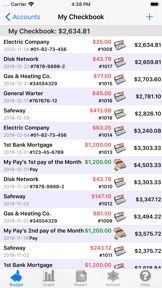
Budget Touch uses the envelope model of budgeting. Set aside money for your standard expenses, then know how much you have left to enjoy.
Enter your expenses, and view your account and envelope balances while on the go. You can also get reports, see graphs, list your transactions, and much more.
Budget Touch can be used stand alone or synced with the desktop version of Budget (Mac or Windows) via WiFi. When used together Budget and Budget Touch are an unbeatable combination to help you manage your money, stay out of debt, and save for the fun things in life.
Features:
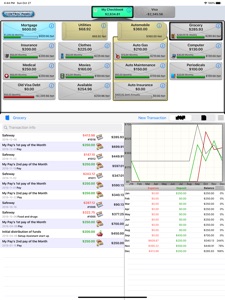
- Beautiful and fluid interface on iPad takes full advantage of the large screen.
- Password protected with strong AES-128 encryption of your data.
- Fast transaction entry: Select from a list of previous entries or type a new entry, enter an amount, and touch save. It's that simple.
- Transaction support for deposits, checks, debits, ATM, charges, refunds, and credit card payments.
- Create transactions in single envelopes or split them between multiple envelopes.
- Enter your income to a single envelope or use the split deposit to manually distribute it.
- Transfer money between envelopes or accounts.
- View transactions in accounts or envelopes.
- Organize your transactions by month, quarter, or year.
- Create as many bank accounts, credit card accounts, envelopes and envelope groups as you want to categorize your expenses.
- Customize your accounts and envelopes with built in icons.
- Set spending limits for your envelopes and see graphically how you are doing.
- See account balances, envelope balances, net balances, and a running balance with your transactions.
- Bank accounts can be reconciled (balanced) against bank statements.
- Get graphs and reports for expenses, deposits, budgets, and many more.
- Export your data via email in either tab-separated, QIF or OFX format.
- Export reports in HTML format.
- Print reports on iOS 4.2 or later.
Pay Source System (Paid Add On)
- Define your income and have Budget Touch calculate how much to put towards each envelope.
- Automatically distribute your income to your envelopes.
Recurring Transactions (Paid Add On)
- Schedule future transactions and be reminded when they are due.
- App icon is badged to show the number of due or overdue transactions. On iOS 4 and later, the badge is updated even when Budget Touch is not running.
Languages:
US English, British English, partial German translation
Requirements:
Compatible with iPad, iPhone and iPod Touch
Requires iOS 4.3 or later
Sync with Mac requires Budget v6.3 or later
Sync with Windows requires Budget v5.0 or later
此版本中有什麼更新? (1.7.2)
Fix date picker regression from v1.7.1.
Clean up Sync window functionality:
a. The system will now prompt you to allow local network access for Budget Touch to sync with the desktop version of Budget.
b. The Done button takes into account the swipe area at the bottom of the screen on iPhones with FaceID.
銷售商
名稱
Snowmint Creative Solutions LLC
資訊
版本
1.7.2
大小
7 MB
Game Center
否
VPP Device Licensing
是
喜好程度
分級:4+
相容性
iOS 8.0 或更新版本
裝置
iPhone 4S, iPhone 5, iPhone 5c, iPhone 5s, iPhone 6, iPhone 6 Plus, iPhone 6s, iPhone 6s Plus, iPhone SE, iPhone 7, iPhone 7 Plus, iPhone 8, iPhone 8 Plus, iPhone X, iPhone XR, iPhone XS, iPhone XS Max, iPhone 11, iPhone 11 Pro, iPhone 11 Pro Max, iPhone SE(第 2 代), iPhone 12, iPhone 12 Pro, iPhone 12 Pro Max, iPhone 12 mini, iPhone 13, iPhone 13 Pro, iPhone 13 Pro Max, iPhone 13 mini, iPhone SE(第 3 代), iPhone 14, iPhone 14 Plus, iPhone 14 Pro, iPhone 14 Pro Max, iPhone 15, iPhone 15 Plus, iPhone 15 Pro, iPhone 15 Pro Max, iPhone 16, iPhone 16 Plus, iPhone 16 Pro, iPhone 16 Pro Max, iPhone 16e, iPhone 17, iPhone 17 Pro, iPhone 17 Pro Max, iPhone Air, iPhone 17e, iPad 2(Wi-Fi), iPad 2(3G), iPad(第三代)(Wi-Fi), iPad(第三代)(4G), iPad(第四代)(Wi-Fi), iPad(第四代)(4G), iPad(第 5 代)Wi-Fi, iPad(第 5 代)Wi-Fi + Cellular, iPad(第 6 代)Wi-Fi, iPad(第 6 代)Wi-Fi + Cellular, iPad Pro, iPad Pro (Cellular), iPad Pro(9.7 英吋), iPad Pro(9.7 英吋)(Cellular), iPad Pro 12.9 英寸(第 2 代), iPad Pro 12.9 英寸(第 2 代) Wi-Fi + Cellular, iPad Pro(10.5 英寸), iPad Pro(10.5 英寸) Wi-Fi + Cellular, iPad Pro(11 英寸), iPad Pro(11 英寸) Wi-Fi + Cellular, iPad Pro 12.9 英寸(第 3 代), iPad Pro 12.9 英寸(第 3 代) Wi-Fi + Cellular, iPad Air, iPad Air (Cellular), iPad Air 2, iPad Air 2 (Cellular), iPad Air(第三代), iPad Air(第三代) Wi-Fi + Cellular, iPad mini (Wi-Fi), iPad mini (4G), iPad mini Retina, iPad mini Retina (Cellular), iPad mini 3, iPad mini 3 (Cellular), iPad mini 4, iPad mini 4 (Cellular), iPad mini(第 5 代), iPad mini(第 5 代)Wi-Fi + Cellular, iPad(第 7 代)Wi-Fi + Cellular, iPad Pro(11 英寸,第 2 代), iPad Pro(11 英寸,第 2 代)(Wi-Fi + 行動網路), iPad Pro(12.9 英寸,第 4 代), iPad Pro(12.9 英寸,第 4 代)(Wi-Fi + 行動網路), iPad Air(第四代)(Wi-Fi), iPad Air(第四代)(Wi-Fi + Cellular), iPad(第 8 代)Wi-Fi, iPad(第 8 代)Wi-Fi + Cellular, iPad Pro(11 英寸,第 3 代), iPad Pro(11 英寸,第 3 代)(Wi-Fi + 行動網路), iPad Pro(12.9 英寸,第 5 代), iPad Pro(12.9 英寸,第 5 代)(Wi-Fi + 行動網路), iPad(第 9 代), iPad(第 9 代)Wi-Fi + Cellular, iPad mini(第 6 代), iPad mini(第 6 代)Wi-Fi + Cellular, iPad Air(第 5 代), iPad Air(第 5 代) Wi-Fi + Cellular, iPad Pro(11 英寸,第 4 代), iPad Pro(11 英寸,第 4 代)(Wi-Fi + 行動網路), iPad Pro(12.9 英寸,第 6 代), iPad Pro(12.9 英寸,第 6 代)(Wi-Fi + 行動網路), iPad(第 10 代), iPad(第 10 代)(Wi-Fi + 行動網路), iPad Air 11 吋(M2)Wi-Fi, iPad Air 13 吋(M2)Wi-Fi, iPad Air 13 吋(M2)Wi-Fi + 行動網路, iPad Pro 11 吋(M4)Wi-Fi, iPad Pro 11 吋(M4)Wi-Fi + 行動網路, iPad Pro 13 吋(M4)Wi-Fi, iPad Pro 13 吋(M4)Wi-Fi + 行動網路, iPad mini(A17 Pro)Wi-Fi, iPad mini(A17 Pro)Wi-Fi + 行動網路, iPad(A16,Wi-Fi), iPad(A16,Wi-Fi + 行動網路), iPad Air(11 吋,M3,Wi-Fi), iPad Air(11 吋,M3,Wi-Fi + 行動網路), iPad Air(13 吋,M3,Wi-Fi), iPad Air(13 吋,M3,Wi-Fi + 行動網路), iPad Pro 11 吋(M5)Wi-Fi, iPad Pro 11 吋(M5)Wi-Fi + 行動網路, iPad Pro 13 吋(M5)Wi-Fi, iPad Pro 13 吋(M5)Wi-Fi + 行動網路, iPad Air(11 吋,M4,Wi-Fi), iPad Air(11 吋,M4,Wi-Fi + 行動網路), iPad Air(13 吋,M4,Wi-Fi), iPad Air(13 吋,M4,Wi-Fi + 行動網路), iPod touch(第五代), iPod touch (第六代), iPod touch (第 7 代), Apple Watch Series 4, Apple Watch Series 5, Apple Watch Series 6(GPS), Apple Watch Series 6(GPS + 行動網路), Apple Watch Series SE(GPS), Apple Watch Series SE(GPS + 行動網路), Apple Watch Series 7(GPS), Apple Watch Series 7(GPS + 行動網路), Apple Watch Series 8(GPS), Apple Watch Series 8(GPS + 行動網路), Apple Watch SE(第 2 代) (GPS), Apple Watch SE(第 2 代) (GPS + 行動網路), Apple Watch Ultra, Apple Watch Series 9(GPS), Apple Watch Series 9(GPS + 行動網路), Apple Watch Ultra 2, Apple Watch Series 10(GPS), Apple Watch Series 10(GPS + 行動網路), Apple Watch Series 11(GPS), Apple Watch Series 11(GPS + 行動網路), Apple Watch SE 3(GPS), Apple Watch SE 3(GPS + 行動網路), Apple Watch Ultra 3(GPS + 行動網路)
語言
德文, 英文
App Store:評等
評分與評論
0.0/5 (無評分)
App Store:評論
無條目