關於使用條款隱私政策聯絡
 
更新中
Dimension Marker

Dimension Marker

發行日期:2010-03-20
© 2009-2017 Cross-Discipline Technology Limited
Dimension Marker - QR碼
版本 2.0
4+
App Store 下載
版本 2.0
4+
App Store 下載
發行日期:2010-03-20
© 2009-2017 Cross-Discipline Technology Limited

iPhone Screenshots

擷圖
擷圖
擷圖
擷圖
擷圖

說明

*** 2017 New update is finally here! Thank everyone for the patience ***
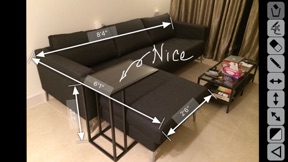
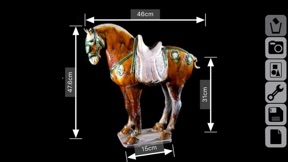
Dimension Marker makes it easy to mark the dimension of any space or object DIRECTLY on photos or sketches - turning your iPhone/iPod touch into a great assistant whenever, for example:
- You need to fit new furniture when you redecorate or renovate your home.
- You bump into a nice piece of home accessory and wondered if it fits somewhere in your home.
- You need to explain the dimension of a product to your customers, in many cases, it's better to email a picture with marked dimensions than to talk over the phone.
Few more examples when you need to remember sizes and dimensions during home improvement or renovation:
- You want to pick the biggest possible flat panel TV that best fit the TV cabinet.
- You bump into a nice piece of decorative item and wondered if it fits into your bookshelf.
- There's a light switch on the wall and you want to find a bookshelf that's either short enough or narrow enough to leave the switch accessible.
- Need to measure the sizes of the 6 windows in the 3 bed rooms, living room and dinning room in order to get the right curtain for the right window.
- You want to get a new cabinet that's big enough but not blocking the power outlet and the picture hung on the wall.
We normally take text notes but sometimes it's confusing. The bed room may have 2 windows and there are 3 walls in the dinning room. Which wall is exactly "wall B" on my note? Which window is "window 1" on my note? I jotted down the "length" of the cabinet, but now I forgot whether I meant the width or height. To avoid mistakes and confusions, nothing's as straight forward as marking the sizes and measurements on the real photo or even a simple sketch. Remember, a picture worth a thousand words. And that's what Dimension Marker's for.
KEY FEATURES:
- Marks measurements and dimension directly on photos or sketches
- Vertical, horizontal and arbitrary arrows
- Choice of Black or White arrows
- Marker pen in Black or White
- Eraser
- Clear all sketches at once
- Insert photo from Photos Album
- Take photo with camera (on iPhones)
- Save your note/work to Photo Album
- Auto save
QUICK TIPS:
- Drag arrow heads to adjust arrow lengths (and the angle of arbitrary arrows)
- Tab on the arrow text to edit
- Drag the arrow body (avoid the text area) to move the arrow
- Drag arrows to the buttons panel (or onto the bin) to delete
- Press the Black/White square button to toggle new arrow and sketch color

此版本中有什麼更新? (2.0)

This app has been updated by Apple to display the Apple Watch app icon.
Totally revamped under the hood!
- Fixed a problem which cause Dimension Marker to crash on newer iOS versions
- Optimized for 9:16 retina displays
- Improved compatibility with iOS8 or later
- New smoother hand sketching and writing
- Improved imported & output image quality

銷售商

名稱

Cross-Discipline Technology Limited

資訊

開發人員

類別

版本

2.0

大小

2.3 MB

Game Center

VPP Device Licensing

喜好程度

分級:4+

相容性

iOS 8.0 或更新版本

裝置

iPhone 4S, iPhone 5, iPhone 5c, iPhone 5s, iPhone 6, iPhone 6 Plus, iPhone 6s, iPhone 6s Plus, iPhone SE, iPhone 7, iPhone 7 Plus, iPhone 8, iPhone 8 Plus, iPhone X, iPhone XR, iPhone XS, iPhone XS Max, iPhone 11, iPhone 11 Pro, iPhone 11 Pro Max, iPhone SE(第 2 代), iPhone 12, iPhone 12 Pro, iPhone 12 Pro Max, iPhone 12 mini, iPhone 13, iPhone 13 Pro, iPhone 13 Pro Max, iPhone 13 mini, iPhone SE(第 3 代), iPhone 14, iPhone 14 Plus, iPhone 14 Pro, iPhone 14 Pro Max, iPhone 15, iPhone 15 Plus, iPhone 15 Pro, iPhone 15 Pro Max, iPhone 16, iPhone 16 Plus, iPhone 16 Pro, iPhone 16 Pro Max, iPhone 16e, iPhone 17, iPhone 17Pro, iPhone 17ProMax, iPhone Air, iPad 2(Wi-Fi), iPad 2(3G), iPad(第三代)(Wi-Fi), iPad(第三代)(4G), iPad(第四代)(Wi-Fi), iPad(第四代)(4G), iPad(第 5 代)Wi-Fi, iPad(第 5 代)Wi-Fi + Cellular, iPad(第 6 代)Wi-Fi, iPad(第 6 代)Wi-Fi + Cellular, iPad Pro, iPad Pro (Cellular), iPad Pro(9.7 英吋), iPad Pro(9.7 英吋)(Cellular), iPad Pro 12.9 英寸(第 2 代), iPad Pro 12.9 英寸(第 2 代) Wi-Fi + Cellular, iPad Pro(10.5 英寸), iPad Pro(10.5 英寸) Wi-Fi + Cellular, iPad Pro(11 英寸), iPad Pro(11 英寸) Wi-Fi + Cellular, iPad Pro 12.9 英寸(第 3 代), iPad Pro 12.9 英寸(第 3 代) Wi-Fi + Cellular, iPad Air, iPad Air (Cellular), iPad Air 2, iPad Air 2 (Cellular), iPad Air(第三代), iPad Air(第三代) Wi-Fi + Cellular, iPad mini (Wi-Fi), iPad mini (4G), iPad mini Retina, iPad mini Retina (Cellular), iPad mini 3, iPad mini 3 (Cellular), iPad mini 4, iPad mini 4 (Cellular), iPad mini(第 5 代), iPad mini(第 5 代)Wi-Fi + Cellular, iPad(第 7 代)Wi-Fi + Cellular, iPad Pro(11 英寸,第 2 代), iPad Pro(11 英寸,第 2 代)(Wi-Fi + 行動網路), iPad Pro(12.9 英寸,第 4 代), iPad Pro(12.9 英寸,第 4 代)(Wi-Fi + 行動網路), iPad Air(第四代)(Wi-Fi), iPad Air(第四代)(Wi-Fi + Cellular), iPad(第 8 代)Wi-Fi, iPad(第 8 代)Wi-Fi + Cellular, iPad Pro(11 英寸,第 3 代), iPad Pro(11 英寸,第 3 代)(Wi-Fi + 行動網路), iPad Pro(12.9 英寸,第 5 代), iPad Pro(12.9 英寸,第 5 代)(Wi-Fi + 行動網路), iPad(第 9 代), iPad(第 9 代)Wi-Fi + Cellular, iPad mini(第 6 代), iPad mini(第 6 代)Wi-Fi + Cellular, iPad Air(第 5 代), iPad Air(第 5 代) Wi-Fi + Cellular, iPad Pro(11 英寸,第 4 代), iPad Pro(11 英寸,第 4 代)(Wi-Fi + 行動網路), iPad Pro(12.9 英寸,第 6 代), iPad Pro(12.9 英寸,第 6 代)(Wi-Fi + 行動網路), iPad(第 10 代), iPad(第 10 代)(Wi-Fi + 行動網路), iPad Air 11 吋(M2)Wi-Fi, iPad Air 13 吋(M2)Wi-Fi, iPad Air 13 吋(M2)Wi-Fi + 行動網路, iPad Pro 11 吋(M4)Wi-Fi, iPad Pro 11 吋(M4)Wi-Fi + 行動網路, iPad Pro 13 吋(M4)Wi-Fi, iPad Pro 13 吋(M4)Wi-Fi + 行動網路, iPad mini(A17 Pro)Wi-Fi, iPad mini(A17 Pro)Wi-Fi + 行動網路, iPad(A16,Wi-Fi), iPad(A16,Wi-Fi + 行動網路), iPad Air(11 吋,M3,Wi-Fi), iPad Air(11 吋,M3,Wi-Fi + 行動網路), iPad Air(13 吋,M3,Wi-Fi), iPad Air(13 吋,M3,Wi-Fi + 行動網路), iPod touch(第五代), iPod touch (第六代), iPod touch (第 7 代)

語言

英文

App Store:評等

評分與評論

1.0/5 (2 評等)

App Store:評論

2015-08-08

Rubbish!

It Can't work
搵笨!!!
版本 1.1
2015-05-27

Rubbish App

It doesn't work. Why?
叮噹朋友
版本 1.1