關於使用條款隱私政策聯絡
 
更新中
Preposition Remix

Preposition Remix

發行日期:2011-05-27
© All rights reserved to Smarty Ears, LLC 2011
Preposition Remix - QR碼
版本 6.5
4+
App Store 下載
版本 6.5
4+
App Store 下載
發行日期:2011-05-27
© All rights reserved to Smarty Ears, LLC 2011

iPhone Screenshots

擷圖
擷圖
擷圖
擷圖
擷圖

iPad Screenshots

擷圖
擷圖
擷圖
擷圖
擷圖
擷圖
擷圖
擷圖
擷圖

說明

Preposition Remix was created specifically to help children improve their mastery of spoken language. Designed by a certified speech-language pathologist, Preposition Remix contains hundreds of carefully selected high-quality images. Perfect for working on the skills needed to understand the relationship between nouns/pronouns and other words, Preposition Remix will help children and English language learners gain the skills needed to follow directions and create grammatically correct sentences.
How to Use
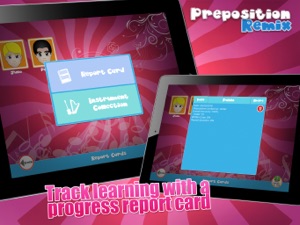
Preposition Remix is designed for single-player use. From the home page the adult has the choice of selecting Support, Report, or Practice. Tap Support to watch the video tutorial, contact the developers, and back-up to iTunes. Tap report to see the data gathered for each client. A simple tap on the Practice button will bring the adult the list of clients and allow the activities to begin. Once the client is selected images are displayed on the screen.
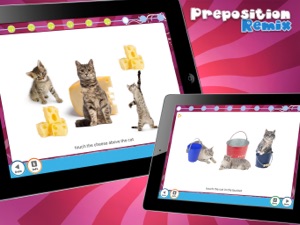
An audio prompt tells the client what to do. If the written prompt is turned on, it will also display at the bottom of the screen. A “play” arrow allows the user to replay the audio prompt. A variety of images are displayed on the screen one of which will be in the target position. The user then selects the item in the correct location. A tap on the “done” button concludes the session and moves the program to the reports area.
Data Collection
When the session is complete, a simple touch to the home button brings the app to the reports area. A touch to the client’s avatar and name brings up the data for that session. The data includes: date of practice, activity, number of attempted targets, and percent accuracy. In addition, a Notes button provides the option to write a note about the session.
Preposition remix data collection reports can be emailed or exported to The Therapy Report Center for easy progress monitoring and report writing.
Customization
Preposition Remix has a “settings” button on the home screen. The settings button allows the user to select specific target prepositions or turn on all prepositions. Within the settings button there are also options to turn on and off written cues, repeat questions, and change the action for incorrect answers. Finally, within the settings area the adult can turn on/off the random question feature. When “random” is off the app moves through all 10 trials for each target preposition, which is ideal for teaching the targeted prepositions. When “random” is turned on, each selected preposition displays randomly which is ideal for formative assessment.
Purpose
Preposition Remix was designed to assist in language therapy by utilizing technology to present prepositions in a fun and interactive way. Created specifically to help individuals improve their mastery of spoken language; Preposition Remix is ideal for those individuals who struggle with following directions and correct sentence structure, as well as for English Language Learners. In addition, professionals working with individuals with intellectual disabilities may find the fun and interactive pictures a great option for those students who require explicit instruction for language skills1.
Features
Preposition Remix has the following features:
•Customizable
•High-quality images
•Over 20 of the most common prepositions ( 200 total screens)
•Data Collection over time for each student
•Compatibility with Therapy Report Center for easy report writing and progress monitoring

此版本中有什麼更新? (6.5)

Updated app for iOS 13

銷售商

資訊

開發人員

類別

版本

6.5

大小

73.3 MB

Game Center

VPP Device Licensing

喜好程度

分級:4+

相容性

iOS 11.0 或更新版本

裝置

iPhone 5s, iPhone 6, iPhone 6 Plus, iPhone 6s, iPhone 6s Plus, iPhone SE, iPhone 7, iPhone 7 Plus, iPhone 8, iPhone 8 Plus, iPhone X, iPhone XR, iPhone XS, iPhone XS Max, iPhone 11, iPhone 11 Pro, iPhone 11 Pro Max, iPhone SE(第 2 代), iPhone 12, iPhone 12 Pro, iPhone 12 Pro Max, iPhone 12 mini, iPhone 13, iPhone 13 Pro, iPhone 13 Pro Max, iPhone 13 mini, iPhone SE(第 3 代), iPhone 14, iPhone 14 Plus, iPhone 14 Pro, iPhone 14 Pro Max, iPhone 15, iPhone 15 Plus, iPhone 15 Pro, iPhone 15 Pro Max, iPhone 16, iPhone 16 Plus, iPhone 16 Pro, iPhone 16 Pro Max, iPhone 16e, iPad(第 5 代)Wi-Fi, iPad(第 5 代)Wi-Fi + Cellular, iPad(第 6 代)Wi-Fi, iPad(第 6 代)Wi-Fi + Cellular, iPad Pro, iPad Pro (Cellular), iPad Pro(9.7 英吋), iPad Pro(9.7 英吋)(Cellular), iPad Pro 12.9 英寸(第 2 代), iPad Pro 12.9 英寸(第 2 代) Wi-Fi + Cellular, iPad Pro(10.5 英寸), iPad Pro(10.5 英寸) Wi-Fi + Cellular, iPad Pro(11 英寸), iPad Pro(11 英寸) Wi-Fi + Cellular, iPad Pro 12.9 英寸(第 3 代), iPad Pro 12.9 英寸(第 3 代) Wi-Fi + Cellular, iPad Air, iPad Air (Cellular), iPad Air 2, iPad Air 2 (Cellular), iPad Air(第三代), iPad Air(第三代) Wi-Fi + Cellular, iPad mini Retina, iPad mini Retina (Cellular), iPad mini 3, iPad mini 3 (Cellular), iPad mini 4, iPad mini 4 (Cellular), iPad mini(第 5 代), iPad mini(第 5 代)Wi-Fi + Cellular, iPad(第 7 代)Wi-Fi + Cellular, iPad Pro(11 英寸,第 2 代), iPad Pro(11 英寸,第 2 代)(Wi-Fi + 行動網路), iPad Pro(12.9 英寸,第 4 代), iPad Pro(12.9 英寸,第 4 代)(Wi-Fi + 行動網路), iPad Air(第四代)(Wi-Fi), iPad Air(第四代)(Wi-Fi + Cellular), iPad(第 8 代)Wi-Fi, iPad(第 8 代)Wi-Fi + Cellular, iPad Pro(11 英寸,第 3 代), iPad Pro(11 英寸,第 3 代)(Wi-Fi + 行動網路), iPad Pro(12.9 英寸,第 5 代), iPad Pro(12.9 英寸,第 5 代)(Wi-Fi + 行動網路), iPad(第 9 代), iPad(第 9 代)Wi-Fi + Cellular, iPad mini(第 6 代), iPad mini(第 6 代)Wi-Fi + Cellular, iPad Air(第 5 代), iPad Air(第 5 代) Wi-Fi + Cellular, iPad Pro(11 英寸,第 4 代), iPad Pro(11 英寸,第 4 代)(Wi-Fi + 行動網路), iPad Pro(12.9 英寸,第 6 代), iPad Pro(12.9 英寸,第 6 代)(Wi-Fi + 行動網路), iPad(第 10 代), iPad(第 10 代)(Wi-Fi + 行動網路), iPad Air 11 吋(M2)Wi-Fi, iPad Air 13 吋(M2)Wi-Fi, iPad Air 13 吋(M2)Wi-Fi + 行動網路, iPad Pro 11 吋(M4)Wi-Fi, iPad Pro 11 吋(M4)Wi-Fi + 行動網路, iPad Pro 13 吋(M4)Wi-Fi, iPad Pro 13 吋(M4)Wi-Fi + 行動網路, iPad mini(A17 Pro)Wi-Fi, iPad mini(A17 Pro)Wi-Fi + 行動網路, iPad(A16,Wi-Fi), iPad(A16,Wi-Fi + 行動網路), iPad Air(11 吋,M3,Wi-Fi), iPad Air(11 吋,M3,Wi-Fi + 行動網路), iPad Air(13 吋,M3,Wi-Fi), iPad Air(13 吋,M3,Wi-Fi + 行動網路), iPod touch (第六代), iPod touch (第 7 代)

語言

英文

App Store:評等

評分與評論

1.0/5 (1 評價)

App Store:評論

2011-12-12

Bad experience I never had

The instruction is poor. The graphics and voice are unacceptable.
Sandykfng
版本 1.2