關於使用條款隱私政策聯絡
 
更新中
inShort

inShort

發行日期:2011-03-09
© 2011 - 2022 Jury Shortki
inShort - QR碼
版本 9.0
4+
App Store 下載
版本 9.0
4+
App Store 下載
發行日期:2011-03-09
© 2011 - 2022 Jury Shortki

iPhone Screenshots

擷圖
擷圖
擷圖
擷圖
擷圖
擷圖

iPad Screenshots

擷圖
擷圖
擷圖
擷圖
擷圖
擷圖
擷圖

說明

This application offers a unique approach to project management, which represents your project not just as a plan, but as a coordinated mechanism moving towards the goal.
The original technique allows you to break down project objectives into smaller goals, processes and resources, but not get lost in the details, but always see the overall structure of the project as a whole. After all, project management is not a mechanical observance of the plan, but the achievement of project goals, which should not be overlooked.
The application combines the classic project approach based on Gantt charts and project management through workflow diagrams. As a rule, Gantt charts are ideal for presenting project schedules, but they are not so convenient for reflecting the complex structure of the relationship between processes, goals and resources.
More formally, the program allows you to build a customized, based on the BPMN notation, PERT diagram of the project (with events and processes at nodes). Then this description of the project is used to generate a Gantt chart and track the progress of the project.
So, inShort is a powerful project and business process management tool, which can be applied not only in office but also for personal purposes. You can further explore the capabilities of the program with the detailed interactive User Guide.
Key features of the application: 
• Building the diagram of processes and resources of the project (PERT network diagram of the project, based on BPMN notation). 
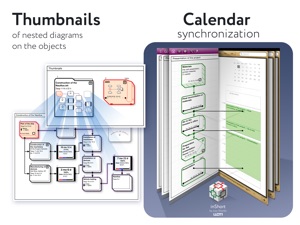
• The ability to drill down the elements of workflow diagrams. 
• Tracking the execution of the project. 
• Integration with the standard Calendar.
• Displaying the list of project tasks in the form of a Gantt chart. 
• Separation of physical and information flows of the project. 
• Ability to specify the expected time of execution, both directly and parametrically.
• Export of charts into PDF files and OPML outlines.
• Project management according to the methodology of the Theory of Constraints. 
• Working calendars taking into account various schedules of work for implementation of tasks. 
• Work resources and their assignment to tasks. 
• Queues of tasks: organize the work with active tasks in accordance with the elements of the GTD methodology.
• Checklists for diagrams — monitor the sequence of actions for project management step by step.
Advanced features of project management in accordance with the Theory of Constraints technique:
• finding the critical path;
• positioning of time buffers of the project;
• calculation of buffer sizes;
• calculation of late starts for feeding paths of the project;
• tracking of time indicators during project execution.
***
inShort Pro — application version for experienced and advanced users, contains advanced and service functions useful for in-depth work with diagrams.
Functions included in inShort Pro:
• Working with layers of diagrams;
• inReview: publications of user diagrams surveys by experienced project managers, indicating successful findings and weaknesses in the diagrams. The procedure for sending diagrams for analysis is described in the Terms of Use.
The inShort Pro version is available by monthly subscription. Subscription automatically renews unless auto-renew is turned off at least 24 hours before the end of the current period.
inShort Pro Subscription Terms of Use link: http://www.shortki.com/inShort/proTerms.html
***
Cannot solve a problem? Draw it inShort and sort things out with it there. It's like voodoo but it works.

此版本中有什麼更新? (9.0)

• Expanded and improved WFL export format.
• Fixed compatibility bugs.
Introducing inShort² for iOS, tons of new features, plus an improved mobile application interface!

銷售商

名稱

Iouri Korotkikh

資訊

開發人員

版本

9.0

大小

57.1 MB

Game Center

VPP Device Licensing

喜好程度

分級:4+

相容性

iOS 9.0 或更新版本

裝置

iPhone 5s, iPhone 6, iPhone 6 Plus, iPhone 6s, iPhone 6s Plus, iPhone SE, iPhone 7, iPhone 7 Plus, iPhone 8, iPhone 8 Plus, iPhone X, iPhone XR, iPhone XS, iPhone XS Max, iPhone 11, iPhone 11 Pro, iPhone 11 Pro Max, iPhone SE(第 2 代), iPhone 12, iPhone 12 Pro, iPhone 12 Pro Max, iPhone 12 mini, iPhone 13, iPhone 13 Pro, iPhone 13 Pro Max, iPhone 13 mini, iPhone SE(第 3 代), iPhone 14, iPhone 14 Plus, iPhone 14 Pro, iPhone 14 Pro Max, iPhone 15, iPhone 15 Plus, iPhone 15 Pro, iPhone 15 Pro Max, iPhone 16, iPhone 16 Plus, iPhone 16 Pro, iPhone 16 Pro Max, iPhone 16e, iPhone 17, iPhone 17 Pro, iPhone 17 Pro Max, iPhone Air, iPhone 17e, iPad(第 5 代)Wi-Fi, iPad(第 5 代)Wi-Fi + Cellular, iPad(第 6 代)Wi-Fi, iPad(第 6 代)Wi-Fi + Cellular, iPad Pro, iPad Pro (Cellular), iPad Pro(9.7 英吋), iPad Pro(9.7 英吋)(Cellular), iPad Pro 12.9 英寸(第 2 代), iPad Pro 12.9 英寸(第 2 代) Wi-Fi + Cellular, iPad Pro(10.5 英寸), iPad Pro(10.5 英寸) Wi-Fi + Cellular, iPad Pro(11 英寸), iPad Pro(11 英寸) Wi-Fi + Cellular, iPad Pro 12.9 英寸(第 3 代), iPad Pro 12.9 英寸(第 3 代) Wi-Fi + Cellular, iPad Air, iPad Air (Cellular), iPad Air 2, iPad Air 2 (Cellular), iPad Air(第三代), iPad Air(第三代) Wi-Fi + Cellular, iPad mini Retina, iPad mini Retina (Cellular), iPad mini 3, iPad mini 3 (Cellular), iPad mini 4, iPad mini 4 (Cellular), iPad mini(第 5 代), iPad mini(第 5 代)Wi-Fi + Cellular, iPad(第 7 代)Wi-Fi + Cellular, iPad Pro(11 英寸,第 2 代), iPad Pro(11 英寸,第 2 代)(Wi-Fi + 行動網路), iPad Pro(12.9 英寸,第 4 代), iPad Pro(12.9 英寸,第 4 代)(Wi-Fi + 行動網路), iPad Air(第四代)(Wi-Fi), iPad Air(第四代)(Wi-Fi + Cellular), iPad(第 8 代)Wi-Fi, iPad(第 8 代)Wi-Fi + Cellular, iPad Pro(11 英寸,第 3 代), iPad Pro(11 英寸,第 3 代)(Wi-Fi + 行動網路), iPad Pro(12.9 英寸,第 5 代), iPad Pro(12.9 英寸,第 5 代)(Wi-Fi + 行動網路), iPad(第 9 代), iPad(第 9 代)Wi-Fi + Cellular, iPad mini(第 6 代), iPad mini(第 6 代)Wi-Fi + Cellular, iPad Air(第 5 代), iPad Air(第 5 代) Wi-Fi + Cellular, iPad Pro(11 英寸,第 4 代), iPad Pro(11 英寸,第 4 代)(Wi-Fi + 行動網路), iPad Pro(12.9 英寸,第 6 代), iPad Pro(12.9 英寸,第 6 代)(Wi-Fi + 行動網路), iPad(第 10 代), iPad(第 10 代)(Wi-Fi + 行動網路), iPad Air 11 吋(M2)Wi-Fi, iPad Air 13 吋(M2)Wi-Fi, iPad Air 13 吋(M2)Wi-Fi + 行動網路, iPad Pro 11 吋(M4)Wi-Fi, iPad Pro 11 吋(M4)Wi-Fi + 行動網路, iPad Pro 13 吋(M4)Wi-Fi, iPad Pro 13 吋(M4)Wi-Fi + 行動網路, iPad mini(A17 Pro)Wi-Fi, iPad mini(A17 Pro)Wi-Fi + 行動網路, iPad(A16,Wi-Fi), iPad(A16,Wi-Fi + 行動網路), iPad Air(11 吋,M3,Wi-Fi), iPad Air(11 吋,M3,Wi-Fi + 行動網路), iPad Air(13 吋,M3,Wi-Fi), iPad Air(13 吋,M3,Wi-Fi + 行動網路), iPad Pro 11 吋(M5)Wi-Fi, iPad Pro 11 吋(M5)Wi-Fi + 行動網路, iPad Pro 13 吋(M5)Wi-Fi, iPad Pro 13 吋(M5)Wi-Fi + 行動網路, iPad Air(11 吋,M4,Wi-Fi), iPad Air(11 吋,M4,Wi-Fi + 行動網路), iPad Air(13 吋,M4,Wi-Fi), iPad Air(13 吋,M4,Wi-Fi + 行動網路), iPod touch (第六代), iPod touch (第 7 代)

語言

中文, 俄文, 德文, 法文, 英文

App Store:評等

評分與評論

5.0/5 (1 評價)

App Store:評論

2012-08-06

How to save

Powerful, i like how it can be be complex and simple depending on need.
Not so simple, to learn. A quick start helps.
-How to save". No button.
-How to copy a project and rename / adjust it.
It crashes on me and I lost a lot of work.
As soon as I click on any of the auto save settings the program crashes out. I have 5 gig of free space.
leonthedesigner
版本 3.2.3
2011-12-01

Wonderful.

Highly recommended.
The apps is really comprehensive (with such tiny app size), but included key functions of MS project + some basic graphic function of Visio.
That is wonderful for manager involving with process, project and schedule.
Cosom
版本 4.1.7
2011-10-31

good

i like it
carloslau