更新中


iPhone Screenshots




iPad Screenshots


說明
WeatherFX is an app that is helpful to people who either work or play outdoors.
Features:
• Current International Weather Conditions
• Up to 5 days of forecast data
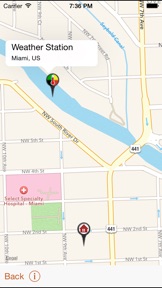
• Map with your location and closest weather station
• Heat Flag Condition
• Fluid Consumption and work Rest Ratios
• Manual and Random Estimations
• Spanish, French, Portuguese and Dutch Languages
• Locale Support for time and measurements
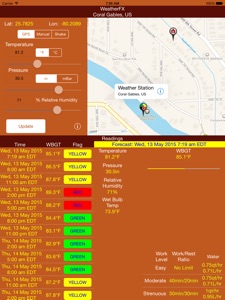
The app can provide guidance on work/rest ratios and fluid intake due to high temperatures. WeatherFX is an app that can retrieve temperature, barometric pressure and relative humidity based on the iPhone/iPad GPS data. The app will also approximate the wet bulb and wet bulb globe (WBGT) temperatures from the retrieved values. Please note that the WBGT is just an estimate. The estimate does not account for wind or low light conditions. The estimate is based on a moderate amount of sunlight. True WBGT can only be acquired through WBGT instrumentation.
Once you accept the prompt to acquire the GPS position, the Latitude and Longitude labels will be populated. Click the “Update” button and the app will populate the temperature, pressure and humidity text fields based the closest weather Station ID to your position. The app will then calculate the wet bulb and WBGT temperatures. You'll also notice that the WeatherFX app will place the location name and time of the reading at the top of the screen. This way you will know if the readings are in your location and timely.
Besides acquiring the weather from GPS you may get your own estimates for wet bulb and WBGT temperatures by typing temperature, pressure and humidity into the respective text fields. Click the “Manual” segmented button, enter the white fields followed by clicking the “Update” button.
The app will also compute random numbers for temperature, pressure and humidity clicking the "Shake" segmented button. The device may be shaken and new settings will populate the fields. Click update button and the random wet bulb and WBGT temperatures will be computed.
After an update has been executed, you may use WeatherFX to quickly convert temperatures from Fahrenheit to Celsius and vice versa by clicking the desired “°F” or "°C” segmented buttons. Barometric pressure may be converted from inches mercury to millibars and vice versa by clicking the desired “in” or “mBar” segmented buttons.
After an update you will be presented with a flag condition button on the bottom left of the screen. The flag condition is derived from the WBGT estimate. If the flag condition is not “NONE”, you may click on the condition to yield work to rest ratios and water consumption given the current estimated flag condition. These figures are posted as a quick and portable reference only. Guidance for these figures are acquired from the U.S. Marine Corps Order 6200.1E dated June, 2002. You are strongly advised to read the complete guidance to know what each entry means.
此版本中有什麼更新? (5.0)
This app has been updated by Apple to display the Apple Watch app icon.
Updated for iOS 9.0
資訊
開發人員
類別
版本
5.0
大小
1.8 MB
Game Center
否
VPP Device Licensing
是
喜好程度
分級:4+
相容性
iOS 9.0 或更新版本
裝置
iPhone 4S, iPhone 5, iPhone 5c, iPhone 5s, iPhone 6, iPhone 6 Plus, iPhone 6s, iPhone 6s Plus, iPhone SE, iPhone 7, iPhone 7 Plus, iPhone 8, iPhone 8 Plus, iPhone X, iPhone XR, iPhone XS, iPhone XS Max, iPhone 11, iPhone 11 Pro, iPhone 11 Pro Max, iPhone SE(第 2 代), iPhone 12, iPhone 12 Pro, iPhone 12 Pro Max, iPhone 12 mini, iPhone 13, iPhone 13 Pro, iPhone 13 Pro Max, iPhone 13 mini, iPhone SE(第 3 代), iPhone 14, iPhone 14 Plus, iPhone 14 Pro, iPhone 14 Pro Max, iPhone 15, iPhone 15 Plus, iPhone 15 Pro, iPhone 15 Pro Max, iPhone 16, iPhone 16 Plus, iPhone 16 Pro, iPhone 16 Pro Max, iPhone 16e, iPad 2(Wi-Fi), iPad 2(3G), iPad(第三代)(Wi-Fi), iPad(第三代)(4G), iPad(第四代)(Wi-Fi), iPad(第四代)(4G), iPad(第 5 代)Wi-Fi, iPad(第 5 代)Wi-Fi + Cellular, iPad(第 6 代)Wi-Fi, iPad(第 6 代)Wi-Fi + Cellular, iPad Pro, iPad Pro (Cellular), iPad Pro(9.7 英吋), iPad Pro(9.7 英吋)(Cellular), iPad Pro 12.9 英寸(第 2 代), iPad Pro 12.9 英寸(第 2 代) Wi-Fi + Cellular, iPad Pro(10.5 英寸), iPad Pro(10.5 英寸) Wi-Fi + Cellular, iPad Pro(11 英寸), iPad Pro(11 英寸) Wi-Fi + Cellular, iPad Pro 12.9 英寸(第 3 代), iPad Pro 12.9 英寸(第 3 代) Wi-Fi + Cellular, iPad Air, iPad Air (Cellular), iPad Air 2, iPad Air 2 (Cellular), iPad Air(第三代), iPad Air(第三代) Wi-Fi + Cellular, iPad mini (Wi-Fi), iPad mini (4G), iPad mini Retina, iPad mini Retina (Cellular), iPad mini 3, iPad mini 3 (Cellular), iPad mini 4, iPad mini 4 (Cellular), iPad mini(第 5 代), iPad mini(第 5 代)Wi-Fi + Cellular, iPad(第 7 代)Wi-Fi + Cellular, iPad Pro(11 英寸,第 2 代), iPad Pro(11 英寸,第 2 代)(Wi-Fi + 行動網路), iPad Pro(12.9 英寸,第 4 代), iPad Pro(12.9 英寸,第 4 代)(Wi-Fi + 行動網路), iPad Air(第四代)(Wi-Fi), iPad Air(第四代)(Wi-Fi + Cellular), iPad(第 8 代)Wi-Fi, iPad(第 8 代)Wi-Fi + Cellular, iPad Pro(11 英寸,第 3 代), iPad Pro(11 英寸,第 3 代)(Wi-Fi + 行動網路), iPad Pro(12.9 英寸,第 5 代), iPad Pro(12.9 英寸,第 5 代)(Wi-Fi + 行動網路), iPad(第 9 代), iPad(第 9 代)Wi-Fi + Cellular, iPad mini(第 6 代), iPad mini(第 6 代)Wi-Fi + Cellular, iPad Air(第 5 代), iPad Air(第 5 代) Wi-Fi + Cellular, iPad Pro(11 英寸,第 4 代), iPad Pro(11 英寸,第 4 代)(Wi-Fi + 行動網路), iPad Pro(12.9 英寸,第 6 代), iPad Pro(12.9 英寸,第 6 代)(Wi-Fi + 行動網路), iPad(第 10 代), iPad(第 10 代)(Wi-Fi + 行動網路), iPad Air 11 吋(M2)Wi-Fi, iPad Air 13 吋(M2)Wi-Fi, iPad Air 13 吋(M2)Wi-Fi + 行動網路, iPad Pro 11 吋(M4)Wi-Fi, iPad Pro 11 吋(M4)Wi-Fi + 行動網路, iPad Pro 13 吋(M4)Wi-Fi, iPad Pro 13 吋(M4)Wi-Fi + 行動網路, iPad mini(A17 Pro)Wi-Fi, iPad mini(A17 Pro)Wi-Fi + 行動網路, iPad(A16,Wi-Fi), iPad(A16,Wi-Fi + 行動網路), iPad Air(11 吋,M3,Wi-Fi), iPad Air(11 吋,M3,Wi-Fi + 行動網路), iPad Air(13 吋,M3,Wi-Fi), iPad Air(13 吋,M3,Wi-Fi + 行動網路), iPod touch(第五代), iPod touch (第六代), iPod touch (第 7 代)
語言
南非荷蘭文, 法文, 英文, 荷蘭文, 葡萄牙文, 西班牙文
App Store:評等
評分與評論
0.0/5 (無評分)
App Store:評論
無條目