關於使用條款隱私政策聯絡
 
更新中
1Writer - Markdown Text Editor

1Writer - Markdown Text Editor

發行日期:2013-08-14
© 2025 Ngoc Luu
1Writer - Markdown Text Editor - QR碼
版本 3.3.8
17+
App Store 下載
版本 3.3.8
17+
App Store 下載
發行日期:2013-08-14
© 2025 Ngoc Luu

iPhone Screenshots

擷圖
擷圖
擷圖
擷圖
擷圖
擷圖
擷圖
擷圖
擷圖

iPad Screenshots

擷圖
擷圖
擷圖
擷圖
擷圖
擷圖
擷圖
擷圖
擷圖

說明

1Writer combines all the basic text editing features you would expect with all the advanced features you will ever need. Use 1Writer to write, research, revise, and share your ideas with maximum efficiency.
- - - - - - - - - -
"The only Dropbox- and Markdown-enabled text editor for iPhone that’s clicked with me has been 1Writer. It’s simple, looks great, and gets the job done." - TheSweetSetup.com
"Really great app, really recommend it." - Federico Viticci, MacStories.net
"The app interface is beautiful and distraction-free, with loads of other awesome features lurking beneath its simple exterior. It's now my go-to iPhone text editor." - Chris Gonzales, ToolsandToys.net
"For users that want a great visual experience paired with great support for custom actions and third party apps, 1Writer is an excellent choice." - iMore.com
"1Writer is the most powerful text editor available for iPhone." - Phillip Gruneich
- - - - - - - - - -
CREATE
- Write :: generate and edit plain text or Markdown files.
- Preview :: see the formatted results with Markdown syntax highlighting while you write and a full, rich-text preview when you're done.
- Extended keyboard :: a convenient row of buttons for navigation, formatting, special characters (customizable--pick the characters you use the most).
- Insert photo :: pick a photo or take a new one, and 1Writer will upload it to Dropbox and generate the Markdown-syntax to add it to your document--all in a single action!
- Snippets :: TextExpander Touch support.
- Custom URL actions :: insert a document template, encode a selection and replace the original text, look up synonyms and much more.
- JavaScript :: create even more powerful custom actions using JavaScript—text manipulation, perform a find & replace, interact with the clipboard—the possibilities are endless.
IMPORT
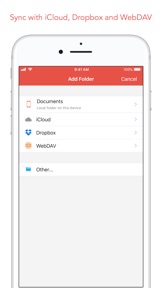
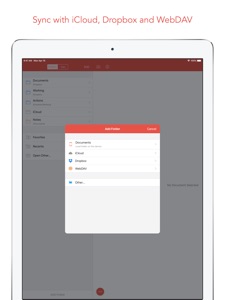
- Sync with iCloud, Dropbox and WebDAV.
- Share extension :: send text to 1Writer from other apps. In Safari, the extension uses the current URL, page title and selected text to create a new document.
- Create, append, prepend, or replace text directly from other apps using the 1Writer URL scheme.
EXPORT
- CloudApp and Dropbox :: generate a link to share your document in plain text or PDF.
- Evernote :: pick your notebook, add tags and turn a text selection or the entire document into a new, rich-text note.
- Copy HTML :: put the formatted text for your document directly on the clipboard.
- Custom actions :: open a web search, tweet a selection, save a series of items in a list and much more.
PERSONALIZE
- Support Dark Mode on iOS 13.
- 2 dark themes for more comfortable reading and writing at night.
- Choose from 20 different fonts.
- Bookmark and sync the Dropbox/WebDAV folders you want to have quick access to the sub-folders and documents you need.
- Use a passcode or Touch ID/Face ID to protect the app from unauthorized users.
RESEARCH
- In-app web browser :: research, look up information without having to leave the app.
- Bookmarks :: create and access your favorite websites.
- Save the current text selection to the clipboard in Markdown syntax.
- 1Password support :: login to all your accounts using the 1Password extension.
EVEN MORE GREAT FEATURES
- Drag and drop.
- Open in Place.
- Multiple windows on iOS 13.
- MultiMarkdown.
- Search documents from Spotlight.
- Find & replace within document.
- Photo and PDF preview.
- Today widget :: access your recent documents from the Notification Center or create a new document in one tap.
- Checklist support :: create a list of things to do or topics to research, and easily check them off.
- Full-text search and hashtag support :: search within a folder to find the document you need, and view related documents that have the same tag.

此版本中有什麼更新? (3.3.8)

Bug fixes.

銷售商

名稱

Ngoc Luu

網址

資訊

開發人員

類別

版本

3.3.8

大小

19.7 MB

Game Center

VPP Device Licensing

喜好程度

Rated 17+ for the following:
不受限制使用網絡

相容性

iOS 13.0 或更新版本

裝置

iPhone 5s, iPhone 6, iPhone 6 Plus, iPhone 6s, iPhone 6s Plus, iPhone SE, iPhone 7, iPhone 7 Plus, iPhone 8, iPhone 8 Plus, iPhone X, iPhone XR, iPhone XS, iPhone XS Max, iPhone 11, iPhone 11 Pro, iPhone 11 Pro Max, iPhone SE(第 2 代), iPhone 12, iPhone 12 Pro, iPhone 12 Pro Max, iPhone 12 mini, iPhone 13, iPhone 13 Pro, iPhone 13 Pro Max, iPhone 13 mini, iPhone SE(第 3 代), iPhone 14, iPhone 14 Plus, iPhone 14 Pro, iPhone 14 Pro Max, iPhone 15, iPhone 15 Plus, iPhone 15 Pro, iPhone 15 Pro Max, iPhone 16, iPhone 16 Plus, iPhone 16 Pro, iPhone 16 Pro Max, iPhone 16e, iPhone 17, iPhone 17 Pro, iPhone 17 Pro Max, iPhone Air, iPad(第 5 代)Wi-Fi, iPad(第 5 代)Wi-Fi + Cellular, iPad(第 6 代)Wi-Fi, iPad(第 6 代)Wi-Fi + Cellular, iPad Pro, iPad Pro (Cellular), iPad Pro(9.7 英吋), iPad Pro(9.7 英吋)(Cellular), iPad Pro 12.9 英寸(第 2 代), iPad Pro 12.9 英寸(第 2 代) Wi-Fi + Cellular, iPad Pro(10.5 英寸), iPad Pro(10.5 英寸) Wi-Fi + Cellular, iPad Pro(11 英寸), iPad Pro(11 英寸) Wi-Fi + Cellular, iPad Pro 12.9 英寸(第 3 代), iPad Pro 12.9 英寸(第 3 代) Wi-Fi + Cellular, iPad Air, iPad Air (Cellular), iPad Air 2, iPad Air 2 (Cellular), iPad Air(第三代), iPad Air(第三代) Wi-Fi + Cellular, iPad mini Retina, iPad mini Retina (Cellular), iPad mini 3, iPad mini 3 (Cellular), iPad mini 4, iPad mini 4 (Cellular), iPad mini(第 5 代), iPad mini(第 5 代)Wi-Fi + Cellular, iPad(第 7 代)Wi-Fi + Cellular, iPad Pro(11 英寸,第 2 代), iPad Pro(11 英寸,第 2 代)(Wi-Fi + 行動網路), iPad Pro(12.9 英寸,第 4 代), iPad Pro(12.9 英寸,第 4 代)(Wi-Fi + 行動網路), iPad Air(第四代)(Wi-Fi), iPad Air(第四代)(Wi-Fi + Cellular), iPad(第 8 代)Wi-Fi, iPad(第 8 代)Wi-Fi + Cellular, iPad Pro(11 英寸,第 3 代), iPad Pro(11 英寸,第 3 代)(Wi-Fi + 行動網路), iPad Pro(12.9 英寸,第 5 代), iPad Pro(12.9 英寸,第 5 代)(Wi-Fi + 行動網路), iPad(第 9 代), iPad(第 9 代)Wi-Fi + Cellular, iPad mini(第 6 代), iPad mini(第 6 代)Wi-Fi + Cellular, iPad Air(第 5 代), iPad Air(第 5 代) Wi-Fi + Cellular, iPad Pro(11 英寸,第 4 代), iPad Pro(11 英寸,第 4 代)(Wi-Fi + 行動網路), iPad Pro(12.9 英寸,第 6 代), iPad Pro(12.9 英寸,第 6 代)(Wi-Fi + 行動網路), iPad(第 10 代), iPad(第 10 代)(Wi-Fi + 行動網路), iPad Air 11 吋(M2)Wi-Fi, iPad Air 13 吋(M2)Wi-Fi, iPad Air 13 吋(M2)Wi-Fi + 行動網路, iPad Pro 11 吋(M4)Wi-Fi, iPad Pro 11 吋(M4)Wi-Fi + 行動網路, iPad Pro 13 吋(M4)Wi-Fi, iPad Pro 13 吋(M4)Wi-Fi + 行動網路, iPad mini(A17 Pro)Wi-Fi, iPad mini(A17 Pro)Wi-Fi + 行動網路, iPad(A16,Wi-Fi), iPad(A16,Wi-Fi + 行動網路), iPad Air(11 吋,M3,Wi-Fi), iPad Air(11 吋,M3,Wi-Fi + 行動網路), iPad Air(13 吋,M3,Wi-Fi), iPad Air(13 吋,M3,Wi-Fi + 行動網路), iPad Pro 11 吋(M5)Wi-Fi, iPad Pro 11 吋(M5)Wi-Fi + 行動網路, iPad Pro 13 吋(M5)Wi-Fi, iPad Pro 13 吋(M5)Wi-Fi + 行動網路, iPod touch (第六代), iPod touch (第 7 代)

語言

中文, 德文, 日文, 英文

App Store:評等

評分與評論

3.7/5 (3 評等)

App Store:評論

2021-03-13

My main note-taking app

Works great with NextCloud to edit Markdown files.
Manu8329
版本 3.3
2017-10-02

Keep crashing with iOS 11

After updating to iOS 11.0.1, the app is almost unusable. It keeps crashing. Whenever I switch to use other apps for a while and switch back to the app, the app will freeze for few seconds. The app is very slow on reading the folders or files even stored on the local app document folders. These never happens before iOS 11.
Lo MW
版本 1.4
2015-09-16

Math equations and symbols

will give 5 stars if there are markdown support for math equations
derricklin918
版本 2.7
2014-08-07

Just Perfect

All the features I need for basic writing are covered by just a simple app.
Jackson@HK
版本 2.1.1