更新中


iPhone Screenshots


iPad Screenshots




說明
ClaroSpeak is a reading and writing app with high-quality text-to-speech, formatting controls, a wide range of fonts and styles and cloud storage integration.
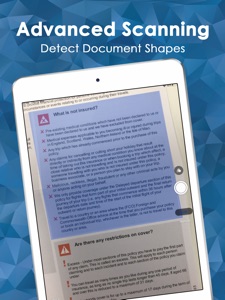
ClaroSpeak Plus also includes our "Capture Text from Photo" feature with high quality Optical Character Recognition (powered by ABBYY).
ClaroSpeak provides visual highlighting in-sync with spoken words, a great range of colour and font settings to allow for optimum reading, and word prediction to help with writing. ClaroSpeak is a quality app for proofreading text through listening, helping with reading and literacy development, and creating audio files from any text.
PRODUCT FEATURES
• Text-to-Speech
- Type into ClaroSpeak and have the text read back to you. You can check text and proofread it quickly and easily.
- You can import documents into ClaroSpeak from apps such as Mail, or import directly from Dropbox or Google Drive using ClaroSpeak's integration. ClaroSpeak can open a range of document formats including Word doc, PDF and epub.
- Text from any app can be copied and pasted into ClaroSpeak ready to be read back.
- Apple's speech recognition can be used to dictate text directly into ClaroSpeak, and can be listened back to ensure it is right.
- The Apple spell check works in ClaroSpeak too, further helping accuracy.
- You can save the text as an audio file using the same high-quality voice.
• High-Quality Voices
4 high-quality Nuance Vocalizer voices are available as free downloads, with the language of your choice.
The voice can be made to speak faster or slower. The voices are installed within ClaroSpeak, so they work when not online and do not use up any data allowance.
Additional Nuance & Acapela voices in 30+ languages and even more accents are available through in-app purchase in ClaroSpeak.
• Capture text from photo
This feature lets you select a photo from your library or take a new one with your camera. Your chosen image will be scanned for text, using high-quality OCR (powered by ABBYY), and the text in the image will be inserted into ClaroSpeak.
***Minimum camera spec: 2MP***
• Word Prediction & Autocorrection
Word prediction helps with writing more quickly and accurately. Train dictionaries from the current text so the best suggestions come up first. Enable Claro autocorrect and ClaroSpeak will use our specifically designed correction list to automatically correct misspelt words as they are typed.
• Visual Highlighting
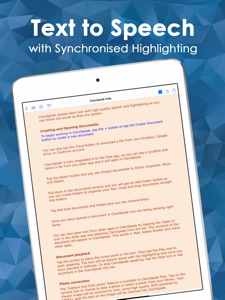
Text is highlighted as the text is read back. Highlighting allows you to coordinate reading and listening. ClaroSpeak lets you pick the colour and style of highlighting required.
There are four highlighting modes to choose from: none, word by word, word trail, or sentence by sentence highlighting.
• Font & Layout
Change the font type, size or colour to suit your needs. Layout the text for easier reading by adjusting the character, line and paragraph spacing and adjusting the page margins. Text can be formatted bold, italic and underlined to emphasise. Images can be inserted into the text from the camera or your library.
• Save to Audio
Convert any text into an audio file using any of the high-quality voices. This is quick and easy, allowing text to be listened to on the move. Great for proofreading on the go.
• Share your text
Text created within ClaroSpeak can be emailed, messaged, printed, opened in another app, or copied and pasted into another app, like Safari. Sending the text to Facebook and Twitter lets you join in with social media.
• Read webpages
You can now read webpages in Safari and other browsers, using the "Read with ClaroSpeak" extension from the share menu.
* Spellcheck
Use ClaroSpeaks new spellcheck feature that can provide you with additional word descriptions and pictures to help you find the correct word.
• Direct Dropbox, Google Drive and OneDrive integration
For the latest news, tips and advice follow @ClaroSpeak on Twitter.
此版本中有什麼更新? (7.7.11)
Fixes an issue where changing some settings in the Claro Keyboard app could cause a crash.
Improves readability of some UI elements in dark mode.
銷售商
名稱
Claro Software Limited
資訊
類別
版本
7.7.11
大小
757.9 MB
Game Center
否
VPP Device Licensing
是
喜好程度
分級:4+
相容性
iOS 13.0 或更新版本
裝置
iPhone 5s, iPhone 6, iPhone 6 Plus, iPhone 6s, iPhone 6s Plus, iPhone SE, iPhone 7, iPhone 7 Plus, iPhone 8, iPhone 8 Plus, iPhone X, iPhone XR, iPhone XS, iPhone XS Max, iPhone 11, iPhone 11 Pro, iPhone 11 Pro Max, iPhone SE(第 2 代), iPhone 12, iPhone 12 Pro, iPhone 12 Pro Max, iPhone 12 mini, iPhone 13, iPhone 13 Pro, iPhone 13 Pro Max, iPhone 13 mini, iPhone SE(第 3 代), iPhone 14, iPhone 14 Plus, iPhone 14 Pro, iPhone 14 Pro Max, iPhone 15, iPhone 15 Plus, iPhone 15 Pro, iPhone 15 Pro Max, iPhone 16, iPhone 16 Plus, iPhone 16 Pro, iPhone 16 Pro Max, iPhone 16e, iPad(第 5 代)Wi-Fi, iPad(第 5 代)Wi-Fi + Cellular, iPad(第 6 代)Wi-Fi, iPad(第 6 代)Wi-Fi + Cellular, iPad Pro, iPad Pro (Cellular), iPad Pro(9.7 英吋), iPad Pro(9.7 英吋)(Cellular), iPad Pro 12.9 英寸(第 2 代), iPad Pro 12.9 英寸(第 2 代) Wi-Fi + Cellular, iPad Pro(10.5 英寸), iPad Pro(10.5 英寸) Wi-Fi + Cellular, iPad Pro(11 英寸), iPad Pro(11 英寸) Wi-Fi + Cellular, iPad Pro 12.9 英寸(第 3 代), iPad Pro 12.9 英寸(第 3 代) Wi-Fi + Cellular, iPad Air, iPad Air (Cellular), iPad Air 2, iPad Air 2 (Cellular), iPad Air(第三代), iPad Air(第三代) Wi-Fi + Cellular, iPad mini Retina, iPad mini Retina (Cellular), iPad mini 3, iPad mini 3 (Cellular), iPad mini 4, iPad mini 4 (Cellular), iPad mini(第 5 代), iPad mini(第 5 代)Wi-Fi + Cellular, iPad(第 7 代)Wi-Fi + Cellular, iPad Pro(11 英寸,第 2 代), iPad Pro(11 英寸,第 2 代)(Wi-Fi + 行動網路), iPad Pro(12.9 英寸,第 4 代), iPad Pro(12.9 英寸,第 4 代)(Wi-Fi + 行動網路), iPad Air(第四代)(Wi-Fi), iPad Air(第四代)(Wi-Fi + Cellular), iPad(第 8 代)Wi-Fi, iPad(第 8 代)Wi-Fi + Cellular, iPad Pro(11 英寸,第 3 代), iPad Pro(11 英寸,第 3 代)(Wi-Fi + 行動網路), iPad Pro(12.9 英寸,第 5 代), iPad Pro(12.9 英寸,第 5 代)(Wi-Fi + 行動網路), iPad(第 9 代), iPad(第 9 代)Wi-Fi + Cellular, iPad mini(第 6 代), iPad mini(第 6 代)Wi-Fi + Cellular, iPad Air(第 5 代), iPad Air(第 5 代) Wi-Fi + Cellular, iPad Pro(11 英寸,第 4 代), iPad Pro(11 英寸,第 4 代)(Wi-Fi + 行動網路), iPad Pro(12.9 英寸,第 6 代), iPad Pro(12.9 英寸,第 6 代)(Wi-Fi + 行動網路), iPad(第 10 代), iPad(第 10 代)(Wi-Fi + 行動網路), iPad Air 11 吋(M2)Wi-Fi, iPad Air 13 吋(M2)Wi-Fi, iPad Air 13 吋(M2)Wi-Fi + 行動網路, iPad Pro 11 吋(M4)Wi-Fi, iPad Pro 11 吋(M4)Wi-Fi + 行動網路, iPad Pro 13 吋(M4)Wi-Fi, iPad Pro 13 吋(M4)Wi-Fi + 行動網路, iPad mini(A17 Pro)Wi-Fi, iPad mini(A17 Pro)Wi-Fi + 行動網路, iPad(A16,Wi-Fi), iPad(A16,Wi-Fi + 行動網路), iPad Air(11 吋,M3,Wi-Fi), iPad Air(11 吋,M3,Wi-Fi + 行動網路), iPad Air(13 吋,M3,Wi-Fi), iPad Air(13 吋,M3,Wi-Fi + 行動網路), iPod touch (第六代), iPod touch (第 7 代)
語言
丹麥文, 德文, 挪威波克默爾文, 法文, 波蘭文, 瑞典文, 義大利文, 英文, 荷蘭文, 葡萄牙文, 西班牙文, 阿拉伯文
App Store:評等
評分與評論
0.0/5 (無評分)
App Store:評論
無條目