關於使用條款隱私政策聯絡
 
更新中
Smart PDF Scanner

Smart PDF Scanner

發行日期:2014-11-14
© 2025 Qrayon, LLC
Smart PDF Scanner - QR碼
版本 2.5
4+
App Store 下載
版本 2.5
4+
App Store 下載
發行日期:2014-11-14
© 2025 Qrayon, LLC

iPhone Screenshots

擷圖
擷圖
擷圖
擷圖
擷圖

iPad Screenshots

擷圖
擷圖
擷圖
擷圖
擷圖

說明

Ditch the office scanner!
Just snap a photo of your document, and get a PDF file you can instantly send to your colleagues, all from your iPhone or iPad.
TACK SHARP SCANS
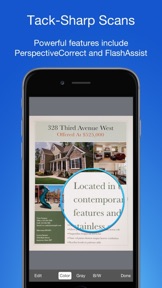
That processor in your phone is quite a little monster. Smart PDF Scanner uses it fully to make the best possible scans. Even full-page articles come out tack-sharp and easy to read.
It automatically detects the page edges and corrects for perspective. Pick full-color scans, grayscale, or black-and-white for maximum legibility. FlashAssist can take perfect scans even in poor lighting conditions. You can even change the correction and enhancement settings after the fact.
POWERFUL COLOR-CODED ORGANIZATION
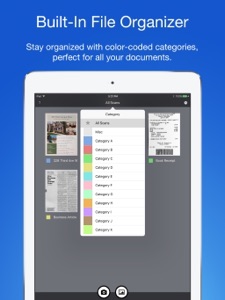
Scanning is just half the problem. You need a good way to keep all your documents organized, and easy to find later. Smart PDF Scanner uses a simple tagging system that is much easier and more powerful than the regular folder system. File documents under custom color-coded categories with just a couple taps. Browse and sort files by category with a couple more.
It's the way filing should work.
EASY TO SHARE
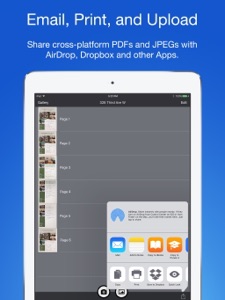
Export scans as PDFs or images, and email or print directly from the App. Files can also be shared via AirDrop, or sent to another App.
Easily upload to Dropbox, Google Drive, and other cloud services with the corresponding third party App. Send PDFs and images to services such as Evernote or OneNote to take advantage of their OCR capabilities.
FOR ALL YOUR SCANNING NEEDS
+ Quickly scan and send contracts and forms
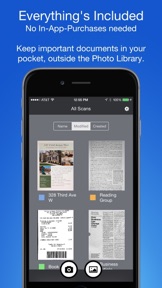
+ Keep scans of important documents in your pocket, separate form the Photo Library
+ Scan all your travel receipts for easy expense reports
+ Keep digital copies of your notes and sketches
+ Scan articles and send them to iBooks to read on the go
+ And more!
APPS BUILT FOR PROFESSIONALS
Smart PDF Scanner uses the latest technologies packed into your iPhone and iPad, but we've worked hard to make it as easy and fast to use as possible. Intelligent image processing eliminates the need for fiddling with complicated controls. That way, you can focus on getting the job done, and doing what you do best.
TIPS AND TRICKS
Here are a few tips to get the best scans:
+ Place your document on a darker surface to improve the edge auto-detection.
+ You can drag the corners of the blue rectangle to fine tune it after taking a photo.
+ Make sure there is adequate lighting. Use the flash in low-light conditions.
+ You can tap on a page to edit its scan settings (including edges) after the fact.
MADE BY DEVELOPERS WHO CARE
We are dedicated to handcrafting the best possible Apps for your iPhone and iPad, and we hope you enjoy using Smart PDF Scanner. If you have any additional questions, please drop us a line via our feedback page.
Best regards,
-- The App Makers @ Qrayon.

此版本中有什麼更新? (2.5)

+ Updated for the latest OS and devices

銷售商

資訊

開發人員

版本

2.5

大小

20.8 MB

Game Center

VPP Device Licensing

喜好程度

分級:4+

相容性

iOS 12.0 或更新版本

裝置

iPhone 5s, iPhone 6, iPhone 6 Plus, iPhone 6s, iPhone 6s Plus, iPhone SE, iPhone 7, iPhone 7 Plus, iPhone 8, iPhone 8 Plus, iPhone X, iPhone XR, iPhone XS, iPhone XS Max, iPhone 11, iPhone 11 Pro, iPhone 11 Pro Max, iPhone SE(第 2 代), iPhone 12, iPhone 12 Pro, iPhone 12 Pro Max, iPhone 12 mini, iPhone 13, iPhone 13 Pro, iPhone 13 Pro Max, iPhone 13 mini, iPhone SE(第 3 代), iPhone 14, iPhone 14 Plus, iPhone 14 Pro, iPhone 14 Pro Max, iPhone 15, iPhone 15 Plus, iPhone 15 Pro, iPhone 15 Pro Max, iPhone 16, iPhone 16 Plus, iPhone 16 Pro, iPhone 16 Pro Max, iPhone 16e, iPhone 17, iPhone 17 Pro, iPhone 17 Pro Max, iPhone Air, iPhone 17e, iPad(第 5 代)Wi-Fi, iPad(第 5 代)Wi-Fi + Cellular, iPad(第 6 代)Wi-Fi, iPad(第 6 代)Wi-Fi + Cellular, iPad Pro, iPad Pro (Cellular), iPad Pro(9.7 英吋), iPad Pro(9.7 英吋)(Cellular), iPad Pro 12.9 英寸(第 2 代), iPad Pro 12.9 英寸(第 2 代) Wi-Fi + Cellular, iPad Pro(10.5 英寸), iPad Pro(10.5 英寸) Wi-Fi + Cellular, iPad Pro(11 英寸), iPad Pro(11 英寸) Wi-Fi + Cellular, iPad Pro 12.9 英寸(第 3 代), iPad Pro 12.9 英寸(第 3 代) Wi-Fi + Cellular, iPad Air, iPad Air (Cellular), iPad Air 2, iPad Air 2 (Cellular), iPad Air(第三代), iPad Air(第三代) Wi-Fi + Cellular, iPad mini Retina, iPad mini Retina (Cellular), iPad mini 3, iPad mini 3 (Cellular), iPad mini 4, iPad mini 4 (Cellular), iPad mini(第 5 代), iPad mini(第 5 代)Wi-Fi + Cellular, iPad(第 7 代)Wi-Fi + Cellular, iPad Pro(11 英寸,第 2 代), iPad Pro(11 英寸,第 2 代)(Wi-Fi + 行動網路), iPad Pro(12.9 英寸,第 4 代), iPad Pro(12.9 英寸,第 4 代)(Wi-Fi + 行動網路), iPad Air(第四代)(Wi-Fi), iPad Air(第四代)(Wi-Fi + Cellular), iPad(第 8 代)Wi-Fi, iPad(第 8 代)Wi-Fi + Cellular, iPad Pro(11 英寸,第 3 代), iPad Pro(11 英寸,第 3 代)(Wi-Fi + 行動網路), iPad Pro(12.9 英寸,第 5 代), iPad Pro(12.9 英寸,第 5 代)(Wi-Fi + 行動網路), iPad(第 9 代), iPad(第 9 代)Wi-Fi + Cellular, iPad mini(第 6 代), iPad mini(第 6 代)Wi-Fi + Cellular, iPad Air(第 5 代), iPad Air(第 5 代) Wi-Fi + Cellular, iPad Pro(11 英寸,第 4 代), iPad Pro(11 英寸,第 4 代)(Wi-Fi + 行動網路), iPad Pro(12.9 英寸,第 6 代), iPad Pro(12.9 英寸,第 6 代)(Wi-Fi + 行動網路), iPad(第 10 代), iPad(第 10 代)(Wi-Fi + 行動網路), iPad Air 11 吋(M2)Wi-Fi, iPad Air 13 吋(M2)Wi-Fi, iPad Air 13 吋(M2)Wi-Fi + 行動網路, iPad Pro 11 吋(M4)Wi-Fi, iPad Pro 11 吋(M4)Wi-Fi + 行動網路, iPad Pro 13 吋(M4)Wi-Fi, iPad Pro 13 吋(M4)Wi-Fi + 行動網路, iPad mini(A17 Pro)Wi-Fi, iPad mini(A17 Pro)Wi-Fi + 行動網路, iPad(A16,Wi-Fi), iPad(A16,Wi-Fi + 行動網路), iPad Air(11 吋,M3,Wi-Fi), iPad Air(11 吋,M3,Wi-Fi + 行動網路), iPad Air(13 吋,M3,Wi-Fi), iPad Air(13 吋,M3,Wi-Fi + 行動網路), iPad Pro 11 吋(M5)Wi-Fi, iPad Pro 11 吋(M5)Wi-Fi + 行動網路, iPad Pro 13 吋(M5)Wi-Fi, iPad Pro 13 吋(M5)Wi-Fi + 行動網路, iPad Air(11 吋,M4,Wi-Fi), iPad Air(11 吋,M4,Wi-Fi + 行動網路), iPad Air(13 吋,M4,Wi-Fi), iPad Air(13 吋,M4,Wi-Fi + 行動網路), iPod touch (第六代), iPod touch (第 7 代)

語言

英文

App Store:評等

評分與評論

4.7/5 (64 評等)

App Store:評論

2018-10-06

Good

Good
FatherJay
版本 2.1
2017-04-30

Meet the purpose but some times crashed

Good thing is that the apps fulfills its purpose ti have documents scanned in colour, grey and bw. It allows the scanned image to realign properly but it crashes.
ckleea
版本 2.0
2017-02-14

ease of use and result good

good
Heygoodly
版本 1.7
2016-11-21

Like

Using friendly
Pierre_bb
版本 1.7